> For the complete documentation index, see [llms.txt](https://digitalgarden.batamladen.com/llms.txt). Markdown versions of documentation pages are available by appending `.md` to page URLs; this page is available as [Markdown](https://digitalgarden.batamladen.com/writeups/thm-rooms/advent-of-cyber-2025/have-you-siem.md).
# Have you SIEM?
## Description
It’s almost Christmas in Wareville, and the team of The Best Festival Company (TBFC) is busy preparing for the big celebration. Everything is running smoothly until the SOC dashboard flashes red. A ransom message suddenly appears:
The message comes from King Malhare, the jealous ruler of HopSec Island, who’s tired of Easter being forgotten. He’s sent his Bandit Bunnies to attack TBFC’s systems and turn Christmas into his new holiday, EAST-mas.
With McSkidy missing and the network under attack, the TBFC SOC team will utilize Splunk to determine how the ransomware infiltrated the system and prevent King Malhare’s plan from being compromised before Christmas.
***
## Walkthrough
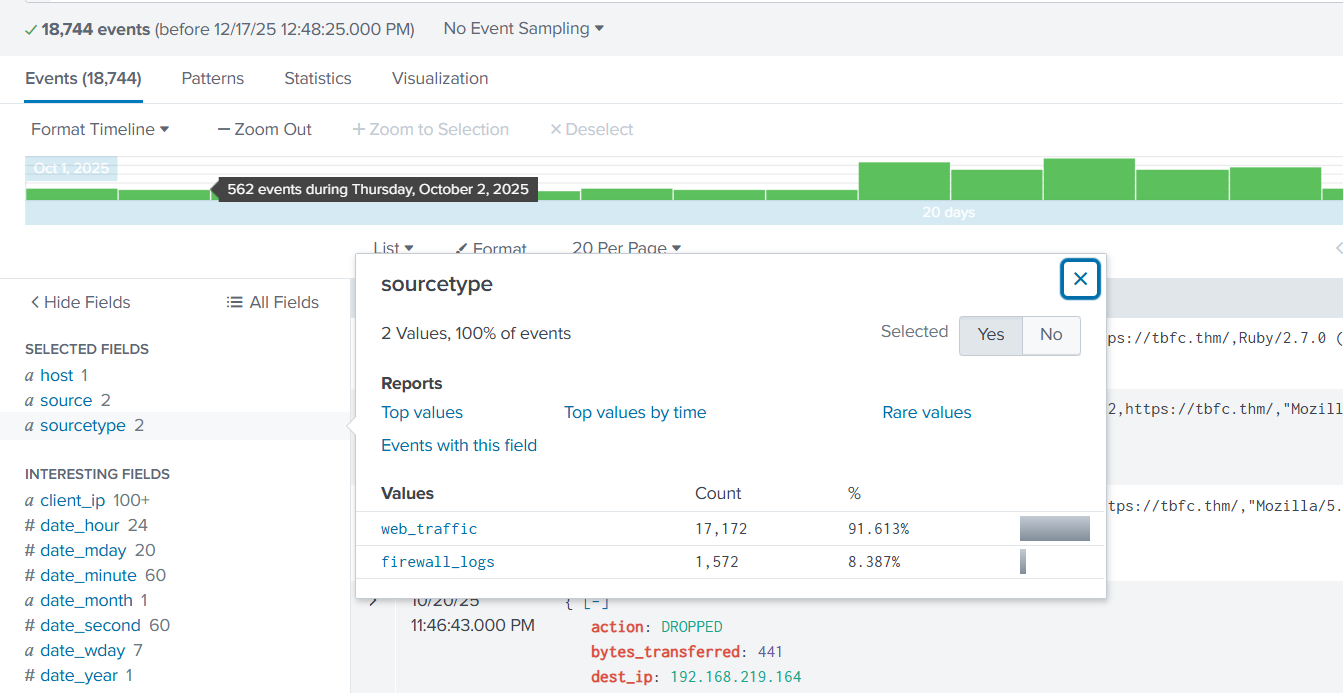
We are presented with direct link to the splunk instance. Emedeatley we check sourcetype from the left panel to see the available datasets, while selecting the all time logs in the "main" index.
We have web traffic logs and firewall logs.
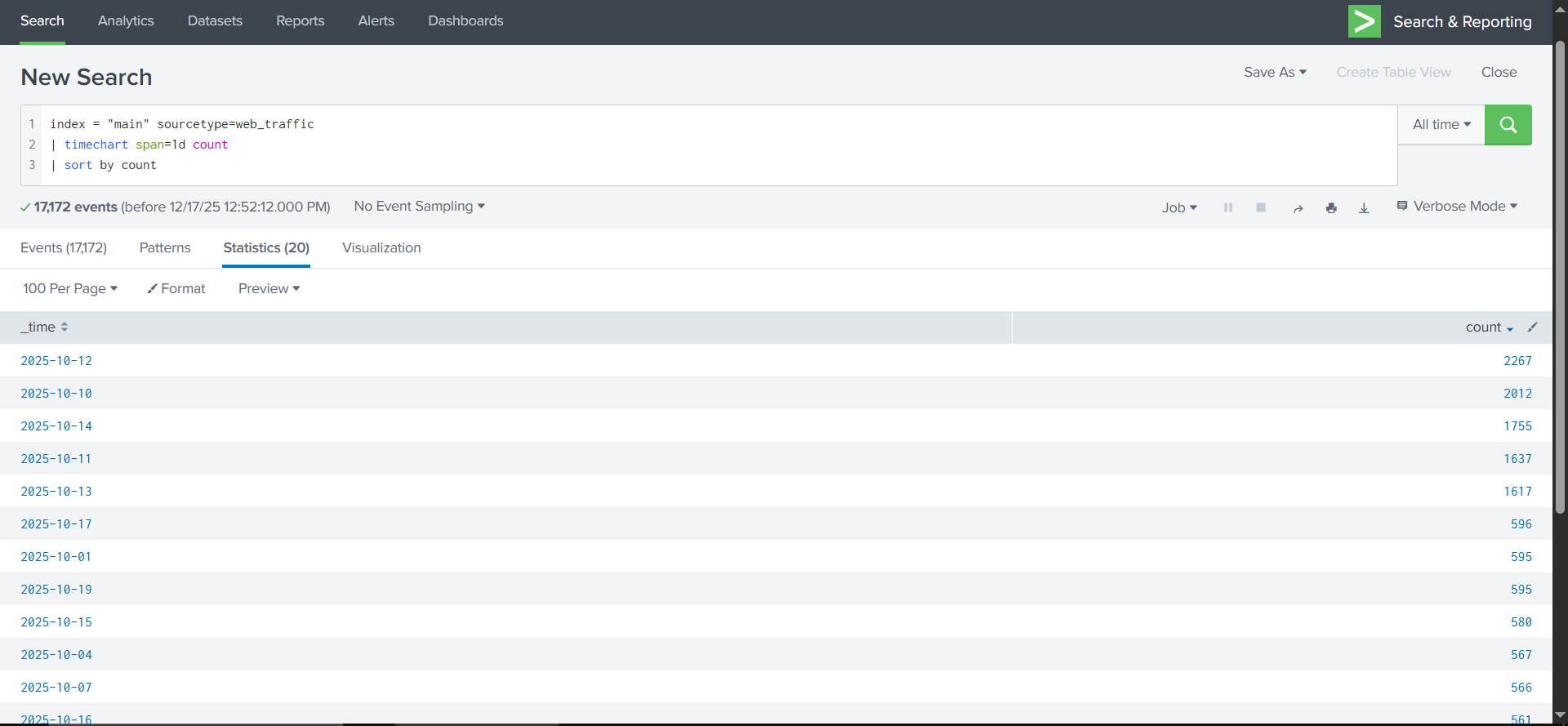
Search for days that had abnormal amount of logs.
And we get a clear picture that period from 10.10 - 14.10 had abnormal amount of traffic indicating that the attack has been during that period.
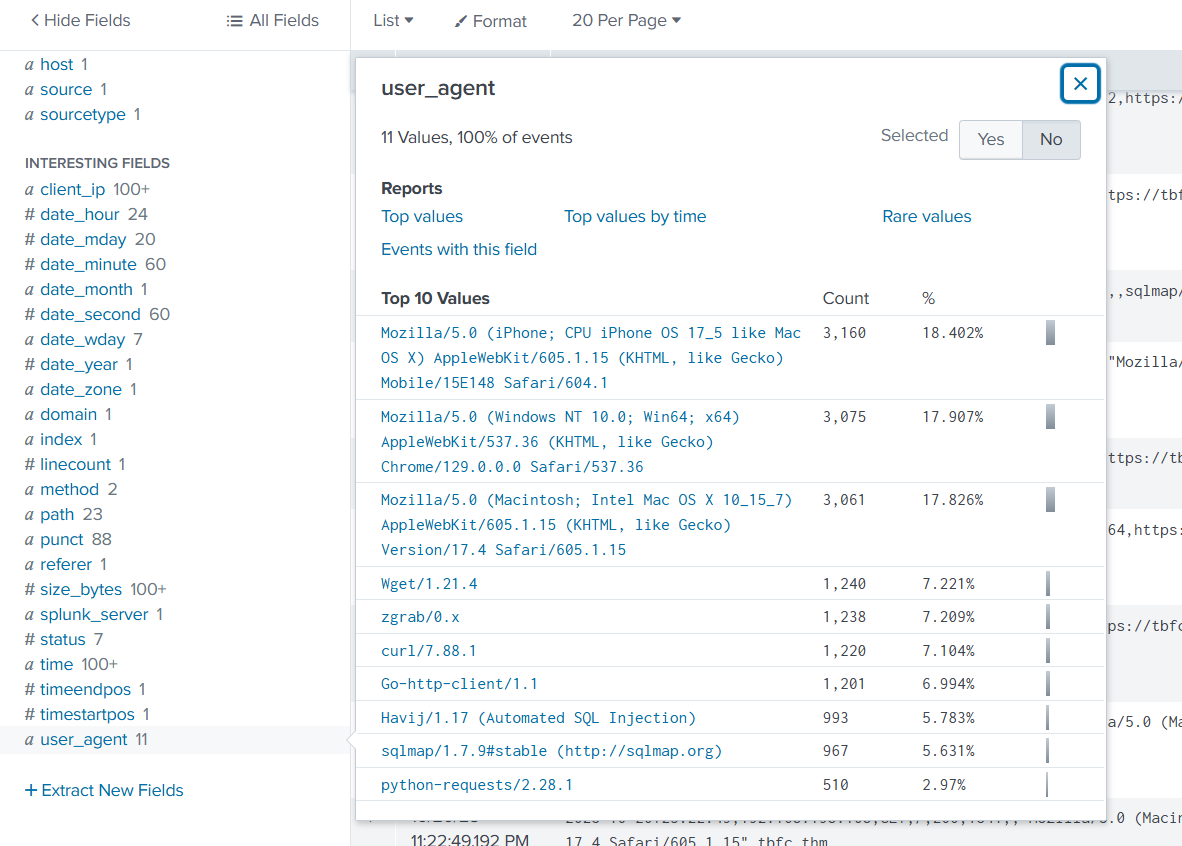
Now selecting user)Agent field from the left bar we get insight apart from the legitimate Mozzila agents, some other as well.
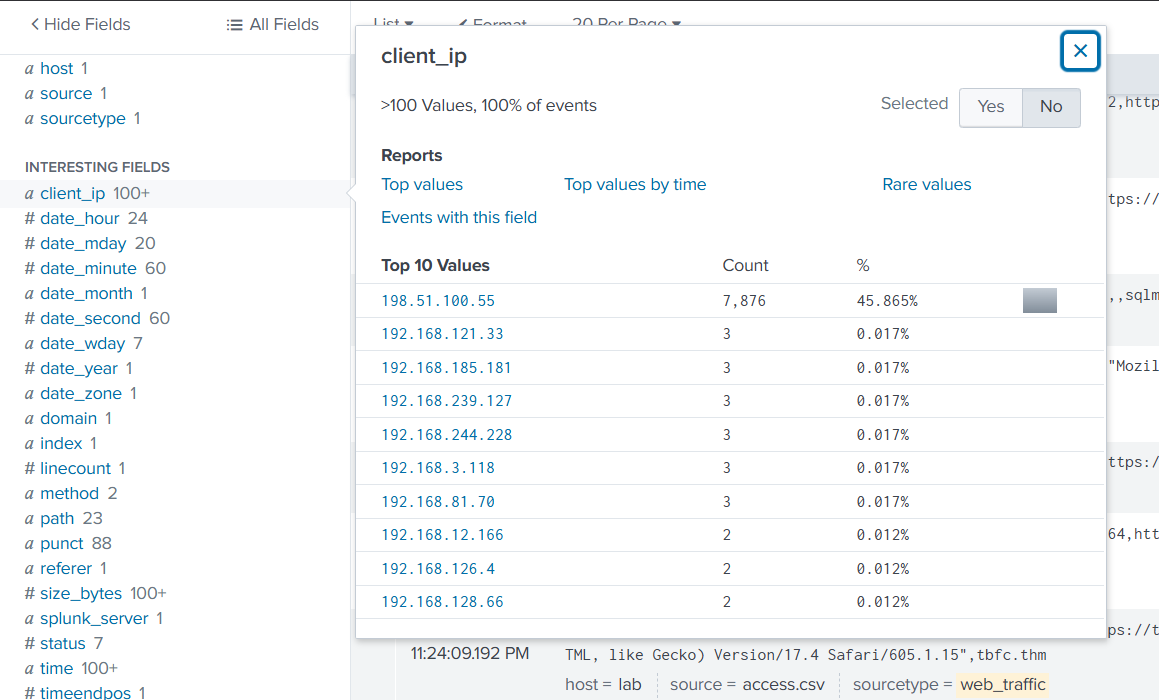
And by selecting the client\_pi field we can see one particilar ip addres standing out.
And adding the path field to see visited url's is a;ways ussefull to examine.
With all that info, we can now think of a SPL query that will narrow down the noise form the logs.
Lets exclude the common user agents first
```
index=main sourcetype=web_traffic user_agent!=*Mozilla* user_agent!=*Chrome* user_agent!=*Safari* user_agent!=*Firefox*
```
And we will see that the logs show are coming 100% of them from the ip addres 198.51.100.55
See some initial probig of common config files:
```
sourcetype=web_traffic client_ip="198.51.100.55" AND path IN ("/.env", "/*phpinfo*", "/.git*") | table _time, path, user_agent, status
```
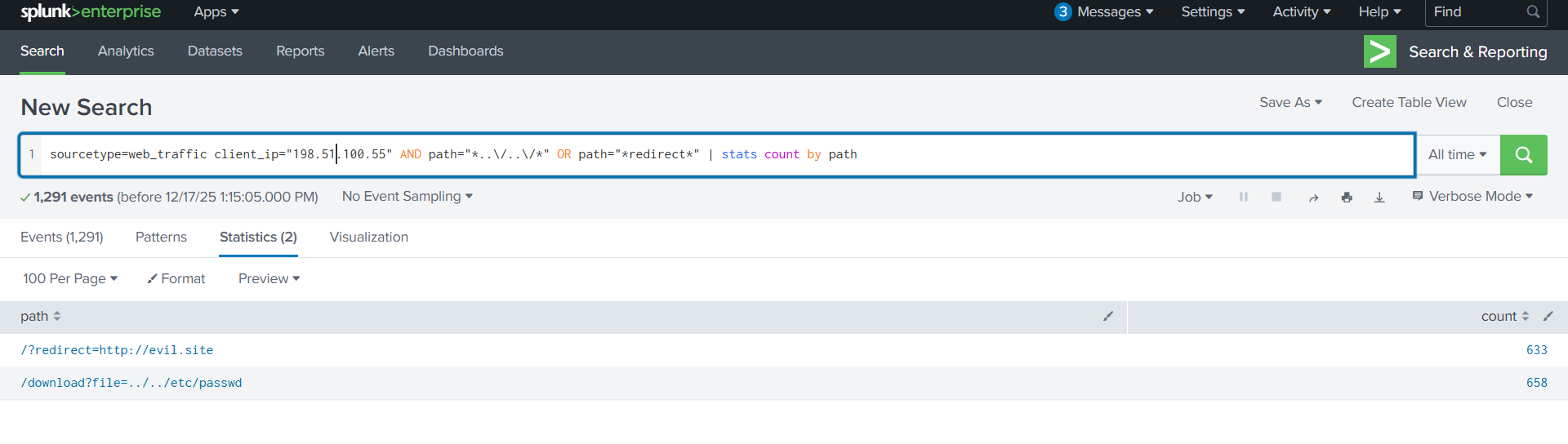
Change the query so that we see count of resource redirects.
```
sourcetype=web_traffic client_ip="" AND path="*..\/..\/*" OR path="*redirect*" | stats count by path
```
```
sourcetype=web_traffic client_ip="198.51.100.55" AND user_agent IN ("*sqlmap*", "*Havij*") | table _time, path, status
```
Search for the common sql inj attack
```
sourcetype=web_traffic client_ip="198.51.100.55" AND path IN ("*backup.zip*", "*logs.tar.gz*") | table _time path, user_agent
```
And see if there were any exfiltrations.
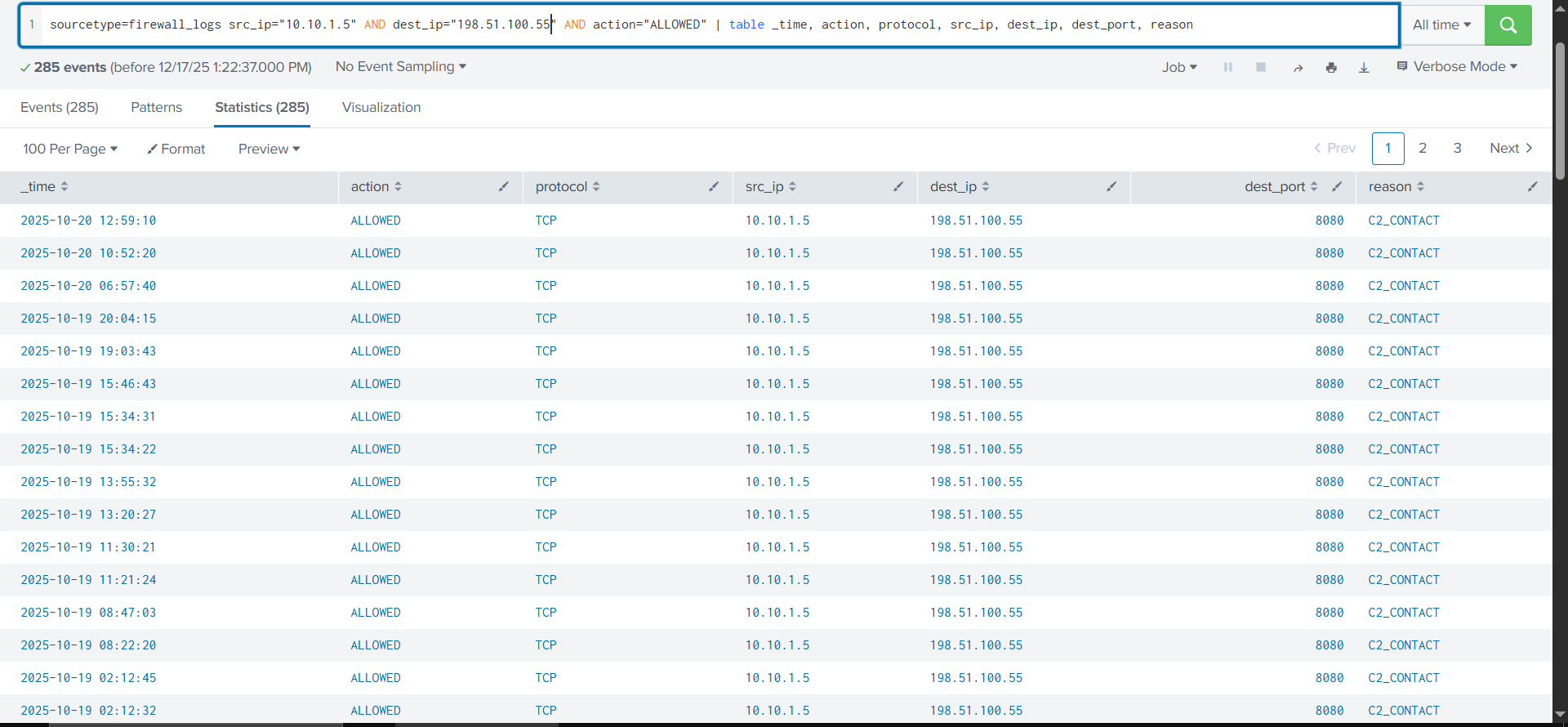
We can throw a look also in the firewall logs using the destination addres of the server and the source 198.51.100.55 in a table view
```
sourcetype=firewall_logs src_ip="10.10.1.5" AND dest_ip="198.51.100.55" AND action="ALLOWED" | table _time, action, protocol, src_ip, dest_ip, dest_port, reason
```
We can see and established connection to a C2 server.
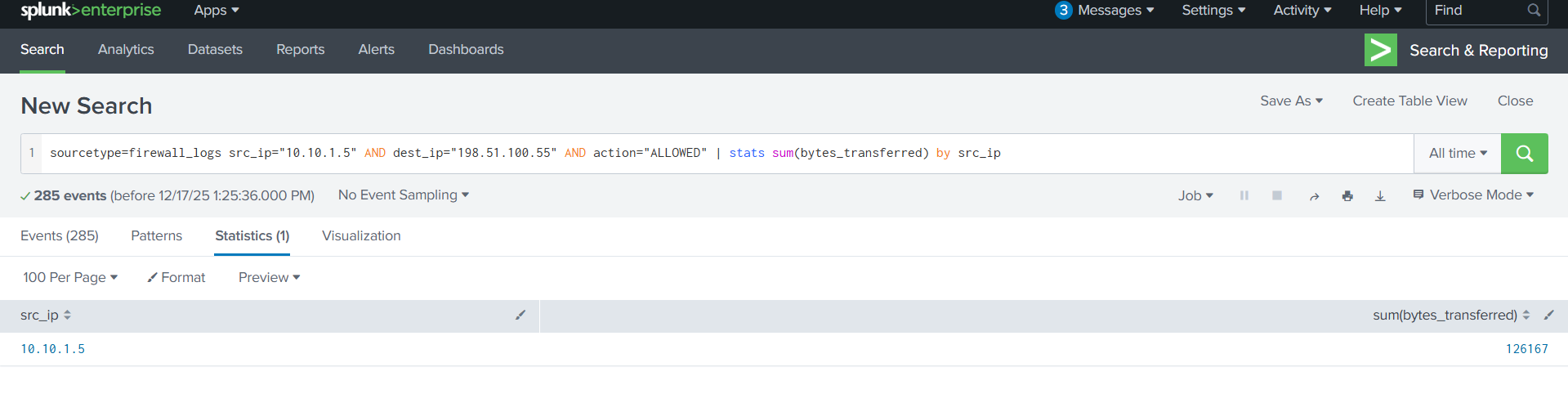
Since the question ask for the abount of data transferred, se can use the query below:
```
sourcetype=firewall_logs src_ip="10.10.1.5" AND dest_ip="198.51.100.55" AND action="ALLOWED" | stats sum(bytes_transferred) by src_ip
```
From the information above, we can answer the required questions.
***
## Questions
What is the attacker IP found attacking and compromising the web server? \
`198.51.100.55`
Which day was the peak traffic in the logs? (Format: YYYY-MM-DD) \
`2025-10-12`
What is the count of Havij user\_agent events found in the logs? \
`933`
How many path traversal attempts to access sensitive files on the server were observed?\
`658`
Examine the firewall logs. How many bytes were transferred to the C2 server IP from the compromised web server?\
`126167`
---
# Agent Instructions
This documentation is published with GitBook. GitBook is the documentation platform designed so that both humans and AI agents can read, navigate, and reason over technical content effectively. Learn more at gitbook.com.
## Querying This Documentation
If you need additional information that is not directly available in this page, you can query the documentation dynamically by asking a question.
Perform an HTTP GET request on the current page URL with the `ask` query parameter, and the optional `goal` query parameter:
```
GET https://digitalgarden.batamladen.com/writeups/thm-rooms/advent-of-cyber-2025/have-you-siem.md?ask=&goal=
```
`ask` is the immediate question: it should be specific, self-contained, and written in natural language.
`goal` is optional and describes the broader end goal you are ultimately trying to accomplish on behalf of the user. GitBook uses it to tailor the answer towards what is most useful for that goal.
The response will contain a direct answer to the question and relevant excerpts and sources from the documentation.
Use this mechanism when the answer is not explicitly present in the current page, you need clarification or additional context, or you want to retrieve related documentation sections.