> For the complete documentation index, see [llms.txt](https://digitalgarden.batamladen.com/llms.txt). Markdown versions of documentation pages are available by appending `.md` to page URLs; this page is available as [Markdown](https://digitalgarden.batamladen.com/writeups/htb-machines/bizness.md).
# Bizness
Release: January 7; 2024 Difficulty: Easy; OS: Linux; Points: 20; Seasson: Seasson 4
## Enumeration
We start with some basic nmap scan looking for open ports on the first 1000 ports.
```
nmap --open 10.10.11.252
```
Nmap scan
Here we can see an ssh and http services running.
Open 10.10.11.252 in browser, it will show the hostname after redirection.
Add the IP and hostname to /etc/hosts
```
sudo nano /etc/hosts
```
From here we see there is a login page [**https://bizness.htb/control/login**](https://bizness.htb/control/login). Opening it we see it is using Apache OFBiz. Take notes of every information you gather so later you know what vulnerabilities to search for.
Login Page
***
## **Vulnerability Analysis**
We search the browser for CVE’s for Apache OFBiz.
And we find **CVE-2024-51467**.
This vulnerability not only exposes the ERP system to potential exploitation but also opens the door to a Server-Side Request Forgery (SSRF) exploit, presenting a dual threat to organizations relying on Apache OFBiz.
***
## **Exploitation**
I discovered a repository that enables us to exploit this vulnerability. :point\_down:
{% embed url="" %}
Clone it using git clone command, don’t forget to add `.git` on the end
```
git clone https://github.com/jakabakos/Apache-OFBiz-Authentication-Bypass.git
```
Cloning git repo
```
cd Apache-OFBiz-Authentication-Bypass
```
Cd in the dir
Once we have it, we want to execute the payload.
Start a netcat listener in a new terminal and than execute the payload in the first terminal.
Executing the payload
Looking back on our netcat listener we can see we got the reverse shell.
Netcat terminal
{% hint style="success" %}
Upgrade the tty for easier navigation. If you dont know how to do that, check this page *(make the page and link up)*.
{% endhint %}
Searching around we find the user flag.
User Flag:
f62f6868b3151990af4621e3d506a999
***
## **Priviliege Escalation**
Searching around the files and gathering more information we come through a valuable file which contains a SHA-Hashed password.
SHA-Hashed passwor
Before we use Hashcat for cracking the hash, let's first sanitize the data using [CyberChef](https://gchq.github.io/CyberChef/#recipe=Find_/_Replace\(%7B%27option%27:%27Regex%27,%27string%27:%27_%27%7D,%27/%27,false,false,false,false\)Find_/_Replace\(%7B%27option%27:%27Regex%27,%27string%27:%27-%27%7D,%27%2B%27,false,false,false,false\)From_Base64\(%27A-Za-z0-9%2B/%3D%27,false,false\)To_Hex\(%27None%27,0\)\&input=dVAwX1FhVkJwRFdGZW84LWRSekRxUndYUTJJ). This will reverse the encoding changes made by base64.urlsafe\_b64encode() and prepare it for hash analysis.
Data sanitization
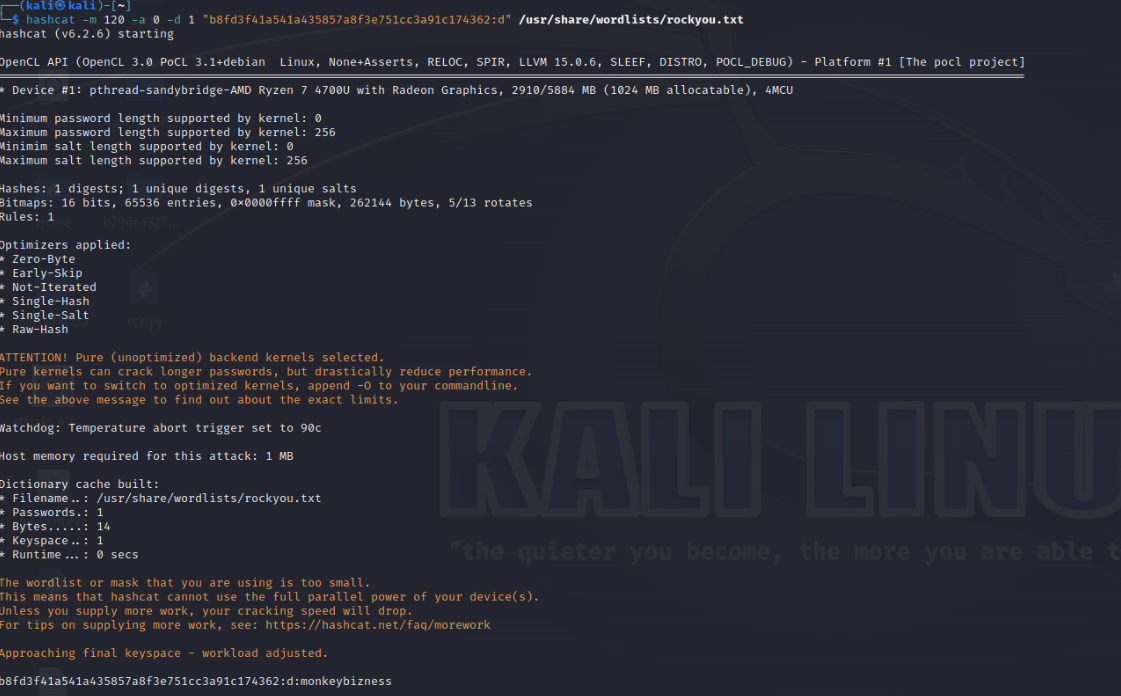
Now paste the output in hashcat with the following flags.
```
hashcat -m 120 -a 0 -d 1 "b8fd3f41a541a435857a8f3e751cc3a91c174362:d" /usr/share/wordlists/dirb/rockyou.txt
```
Decryption
And we got “monkeybizness” as the password.
Login as super user and get the flag.
Root flag:
Root Flag:
7b05c9ab49a63d33b676d2e6bdbe1895
***
---
# Agent Instructions
This documentation is published with GitBook. GitBook is the documentation platform designed so that both humans and AI agents can read, navigate, and reason over technical content effectively. Learn more at gitbook.com.
## Querying This Documentation
If you need additional information that is not directly available in this page, you can query the documentation dynamically by asking a question.
Perform an HTTP GET request on the current page URL with the `ask` query parameter, and the optional `goal` query parameter:
```
GET https://digitalgarden.batamladen.com/writeups/htb-machines/bizness.md?ask=&goal=
```
`ask` is the immediate question: it should be specific, self-contained, and written in natural language.
`goal` is optional and describes the broader end goal you are ultimately trying to accomplish on behalf of the user. GitBook uses it to tailor the answer towards what is most useful for that goal.
The response will contain a direct answer to the question and relevant excerpts and sources from the documentation.
Use this mechanism when the answer is not explicitly present in the current page, you need clarification or additional context, or you want to retrieve related documentation sections.