> For the complete documentation index, see [llms.txt](https://digitalgarden.batamladen.com/llms.txt). Markdown versions of documentation pages are available by appending `.md` to page URLs; this page is available as [Markdown](https://digitalgarden.batamladen.com/notes/programming/assembly/assembly-8086/assembly-8086-basics/memory-and-register-organization-part-1.md).
# Memory and Register Organization (part 1)
## Memory Types
The intel 8086 microprocessor has a few memory types used for different purposes. Witch are: RAM, ROM, Cache, Virtual Memory
### RAM
A type of computer memory that provides read and write access to data quickly and efficiently. It is volatile memory, meaning that it loses its contents when the power is turned off.
▪ **Primary Working Memory**
▪ **Temporary Storage** - Programs and data that are actively used or manipulated during the execution of a program are loaded into RAM for quick access and modification. It loses its stored information when the power is turned off.
▪ **Higher Speed Access** - provides faster access times compared to other types of storage like hard drives or solid-state drives.
▪ **Intermediate between Registers and Permanent Storage** - It acts as an intermediate storage level between the processor's registers and the slower, more permanent storage devices.
▪ **Stack Operation** - storing local variables, return addresses, and other data during subroutine calls and function executions. Variable Storage: RAM is used for storing variables and data structures during program execution.
▪ **Efficient Data Access** - Its random access nature allows for efficient retrieval of data at any memory location
▪ **Cache Interaction** - RAM interacts with the CPU cache hierarchy, influencing the speed of data retrieval.
▪ **Upgradable** - RAM is often expandable, allowing users to upgrade the memory capacity of the system to meet the requirements of more demanding applications.
***
### ROM (Random Access Memory)
ROM is a type of non-volatile memory that retains its content even when the power is turned off. It is called "read-only" because, in most cases, the data stored in ROM cannot be easily modified or overwritten.
**Types:**
▪ **Mask ROM** - The data is permanently written during the manufacturing process.
▪ **Programmable ROM (PROM)** - Users can write data once using special programming equipment.
▪ **Erasable Programmable ROM (EPROM**) - Allows for reprogramming after exposure to ultraviolet light.
▪ **Electrically Erasable Programmable ROM (EEPROM)** - Can be electrically erased and reprogrammed.
**Roles:**
▪ **Firmware Storage** - ROM is commonly used to store firmware, which is a type of software that is embedded in hardware and is responsible for low-level control of specific devices.
▪ **Permanent Instructions** - Critical system instructions, such as the BIOS (Basic Input/Output System) or firmware of peripheral devices, are often stored in ROM.
**Critical instructions:**
▪ **BIOS (Basic Input/Output System)** - The BIOS is a crucial piece of firmware stored in ROM that initializes hardware components during the boot process and provides low-level services to the operating system.
▪ **Bootloader** - The initial bootloader, responsible for loading the operating system into memory, is often stored in ROM
**System Initialization:**
▪ **Power-On Self-Test (POST)** - ROM contains instructions for the POST, a diagnostic process performed during system startup to ensure that essential hardware components are functioning correctly.
▪ **Initialization Routines** - Instructions for initializing system components, such as memory, storage devices, and input/output interfaces, are stored in ROM.
***
### Cache
The Intel 8086 microprocessor is an older architecture, and it does not have the concept of Level 1 (L1) and Level 2 (L2) caches as found in modern processors. The idea of multiple cache levels became more prevalent in later processor architectures.
No L1 or L2 Cache Designation:
▪ The 8086 does not have an explicit Level 1 (L1) or Level 2 (L2) cache as found in modern processors.
▪ Cache hierarchy, as we know it today, became a more prevalent concept in later processor architectures.
▪ The 8086 interacts directly with main memory, fetching instructions and data as needed during program execution.
▪ Memory access times are influenced by the speed of the RAM (Random Access Memory) used in the system.
▪ The 8086 uses a segmented memory model with 20-bit addressing, allowing access to a maximum of 1 MB of memory.
▪ Segments and offsets are used to specify memory addresses, providing a mechanism for addressing different parts of memory.
#### Level 1 Cache
The L1 cache is located close to the CPU, typically directly on the CPU die.
**Size** - It small and mesured in kilobytes. \
**Speed** - L1 cache operates at speeds closely to the CPU clock speed. \
**Purpose** - It serves as a quick access storage unit, minimizing the time the CPU spends waiting for data from slower levels of memory.
#### Level 2 Cache
L2 cache is positioned further from the CPU compared to L1 but is still located on the CPU die mostly.
**Size** - L2 is larger than L1 and is mesured in megabytes. L2 cache is positioned further from the CPU compared to L1 but is still located on the CPU die.\
**Speed** - While not as fast as the L1 cache, the L2 is still faster than the main memory. \
**Purpose** - L2 cache acts as a secondary cache level, offering more storage space for frequently accessed data and instructions, reducing the need to fetch data from slower main memory.
***
### Virtual Memory
The Intel 8086 processor is an older architecture and does not have native support for virtual memory in the way modern processors and operating systems do.
Virtual memory is a feature that allows a computer to compensate for physical memory shortages by temporarily transferring data from random access memory (RAM) to disk storage. This enables the execution of larger programs or multiple programs concurrently.
***
## Addressing Modes
### Immediate Addressing Mode
▪ Syntax: IMMEDIATE DATA \
▪ Description: The operand is a constant value or immediate data. The data is directly specified in the instruction.
Example:
```
MOV AX, 1234h ;Moves the immediate value 1234h into the AX register
```
***
### Register Addresing Mode
▪ Syntax: REGISTER \
▪ Description: The operand is the content of a register.
Example:
```
MOV AX, BX ;Moves the content of the BX register into the AX register
```
***
### Direct Addressing Mode
▪ Syntax: MEMORY \
▪ Description: The operand is the content of a memory location. The effective address is directly specified in the instruction.
Example:
```
MOV AX, [1234h] ;Moves the content of the memory location addressed by 1234h into the AX register
```
***
### Register Indirect Addressing Mode
▪ Syntax: \[REGISTER] \
▪ Description: The operand is the content of the memory location addressed by the content of a register.
Example:
```
MOV AX, [BX] ;Moves the content of the memory location addressed by the content of the BX register into the AX register.
```
***
### Base-Register Addressing Mode
▪ Syntax: \[BASE REGISTER + DISPLACEMENT] \
▪ Description: The operand is at the memory location obtained by adding a displacement to the content of a base register.
Example:
```
MOV AX, [SI + 10 ;Moves the content of the memory location addressed by (SI + 10) into the AX register.
```
***
### Indexed Addressing Mode
▪ Syntax: \[BASE REGISTER + INDEX REGISTER + DISPLACEMENT] \
▪ Description: The operand is at the memory location obtained by adding a displacement to the sum of the contents of a base register and an index register.
Example:
```
MOV AX, [BX + SI + 20] ;Moves the content of the memory location addressed by (BX + SI + 20) into the AX register
```
***
### Based Indexed Addressing Mode:
▪ Syntax: \[BASE REGISTER + INDEX REGISTER + DISPLACEMENT] \
▪ Description: Similar to indexed addressing, but an additional base register is used for a segment address.
Example:
```
MOV AX, [ES:BX + DI + 30] ;Moves the content of the memory location addressed by (ES:BX + DI + 30) into the AX register. ES:BX specifies a memory location that is the value contained in BX "distance" from the start of the segment ES
```
***
### Relative Addressing Mode:
▪ Syntax: LABEL \
▪ Description: Used with branch instructions, where the operand is a label representing a target memory address.
Example: LABEL: MOV AX, 10 CMP AX, 3456h JMP LABEL
```
LABEL:
MOV AX, 10
CMP AX, 3456h
JMP LABEL ;Jumps to the instruction at the specified label
```
***
## Registers
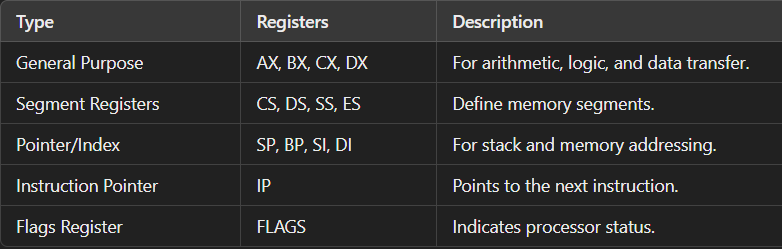
Registers in the **Intel 8086** microprocessor are small, fast storage locations within the CPU that hold data, addresses, or instructions temporarily while they are being processed. Registers are essential for performing arithmetic and logical operations, controlling program execution, and accessing memory.
The Intel 8086 has **14 registers**, which can be categorized into the following types:
1. General-Purpose Registers
2. Segment Registers
3. Pointer and Index Registers
4. Instruction Pointer
5. Flags Register
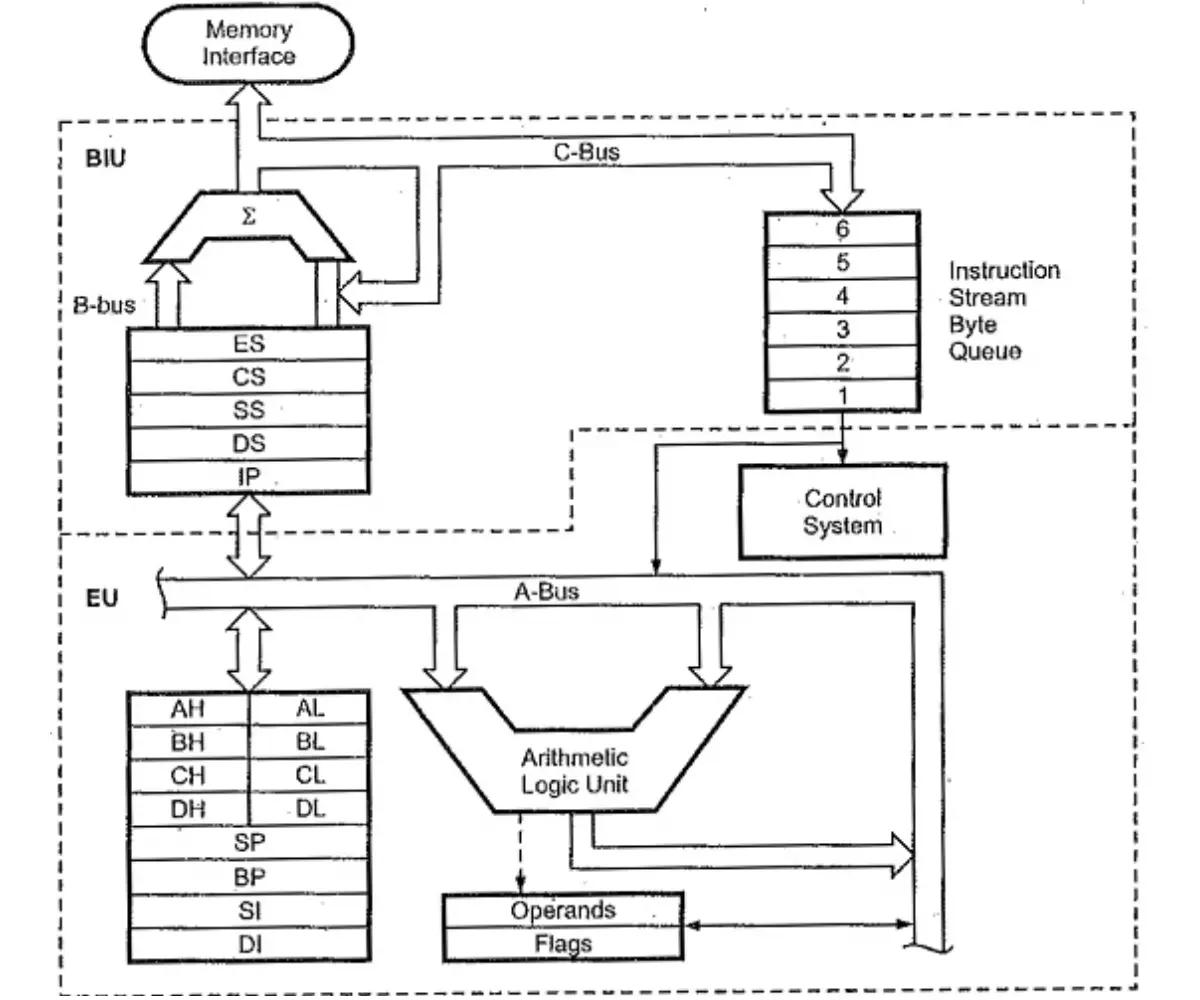
intel 8086 scheme
***
### General purpose Registers
These are used for arithmetic, logic, data transfer, and other general operations. Each register is 16 bits and can be divided into two 8-bit parts: high (H) and low (L).
* **AX (Accumulator Register):**
* Used for arithmetic and data transfer instructions.
* **AH** (high 8 bits) and **AL** (low 8 bits).
* **BX (Base Register):**
* Often used as a base register for addressing memory.
* **BH** and **BL**.
* **CX (Count Register):**
* Used as a counter in loop and shift/rotate instructions.
* **CH** and **CL**.
* **DX (Data Register):**
* Used in I/O operations and for extended precision in multiplication/division.
* **DH** and **DL**.
***
#### AX
The primary accumulator for arithmetic and logic operations.
**Special Features**:
* Some instructions implicitly use AX (e.g., `MUL`, `DIV`, `IN`, `OUT`).
* It is often the fastest and most optimized register for certain operations.
Examples of instructions utilizing the AX register:
MOV (move)
```
# to add
```
ADD (addition)
```
# to add
```
SUB (subtraction)
```
# to add
```
MUL (multiply)
```
# to add
```
IMUL (singed multiply)
```
# to add
```
DIV (divide)
```
# to add
```
INC (increment)
```
# to add
```
DEC (decrement)
```
# to add
```
CMP (compare)
```
# to add
```
AND (logical and)
```
# to add
```
OR (logical or)
```
# to add
```
XOR (logical xor)
```
# to add
```
SHL
```
# to add
```
SHR
```
# to add
```
***
#### BX
General-purpose register with a versatile role in addressing memory locations and manipulating data.
**Special Features**:
* Can be combined with segment registers to compute effective addresses.
Examples of instructions utilizing the CX register:
MOV (move)
```
# to add
```
ADD (addition)
```
# to add
```
SUB (subtraction)
```
# to add
```
MUL (multiply)
```
# to add
```
IMUL (singed multiply)
```
# to add
```
DIV (divide)
```
# to add
```
INC (increment)
```
# to add
```
DEC (decrement)
```
# to add
```
CMP (compare)
```
# to add
```
AND (logical and)
```
# to add
```
OR (logical or)
```
# to add
```
XOR (logical xor)
```
# to add
```
SHL
```
# to add
```
SHR
```
# to add
```
LEA (Load Effective Address)
```
# to add
```
MOVSB (string operation)
```
# to add
```
***
#### CX
The primary accumulator for arithmetic and logic operations.
**Special Features**:
* Instructions like `REP`, `LOOP`, `SHR`, and `ROL` rely on CX implicitly.
* Reducing CX by one is done automatically in looping constructs.
Examples of instructions utilizing the CX register:
MOV (move)
```
# to add
```
ADD (addition)
```
# to add
```
SUB (subtraction)
```
# to add
```
MUL (multiply)
```
# to add
```
IMUL (singed multiply)
```
# to add
```
DIV (divide)
```
# to add
```
INC (increment)
```
# to add
```
DEC (decrement)
```
# to add
```
CMP (compare)
```
# to add
```
AND (logical and)
```
# to add
```
OR (logical or)
```
# to add
```
XOR (logical xor)
```
# to add
```
SHL
```
# to add
```
SHR
```
# to add
```
LOOP
```
MOV CX, 5
LOOP_START:
; The code here
LOOP LOOP_START
```
LODSW (string operation)
```
LODSW
```
***
#### DX
The primary accumulator for arithmetic and logic operations.
**Special Features**:
* In division (`DIV`) and multiplication (`MUL`), DX stores the **most significant bits** of the result.
* Used as an **address pointer** in certain operations.
Examples of instructions utilizing the DX register:
MOV (move)
```
# to add
```
ADD (addition)
```
# to add
```
SUB (subtraction)
```
# to add
```
MUL (multiply)
```
# to add
```
IMUL (singed multiply)
```
# to add
```
DIV (divide)
```
# to add
```
INC (increment)
```
# to add
```
DEC (decrement)
```
# to add
```
CMP (compare)
```
# to add
```
AND (logical and)
```
# to add
```
OR (logical or)
```
# to add
```
XOR (logical xor)
```
# to add
```
SHL
```
# to add
```
SHR
```
# to add
```
**Input and Output**
```
MOV DX, 03F8h
OUT DX, AL
;Specifies the I/O port address in DX and outputs the contents of AL to that port
```
**Interrupt Vector Table**
```
MOV DX, 0013h
MOV AX, 10h
INT 21h
;Specifies the video mode in DX before calling an interrupt
(e.g., INT 21h for DOS services).
```
***
### Pointer and Index Registers
SI (Source Index) and DI (Destination Index)
Two 16-bit registers – usually used in string manipulation operations. Often used in conjunction with string instructions to facilitate the movement of data between memory locations.
These registers simplify the process of moving and manipulating strings in memory, which is a common task in assembly language programming.
SI and DI, along with CX (the count register), are often used in combination to perform efficient block transfers and comparisons.
***
#### SI (Source Index)
**Purpose** - SI is commonly used as an index or pointer to the source data in memory during string operations. \
**Usage** - Instructions like MOVSB (move byte from address pointed by SI to address pointed by DI) or SCASB (scan byte at address pointed by DI and compare with AL) often involve the SI register.
Example:
```
MOV SI, 1000h ; SI points to the source string in memory
MOV AL, [SI] ; AL is loaded with the byte at the memory location pointed by SI
```
***
DI (Destination Index)
**Purpose** - DI is commonly used as an index or pointer to the destination data in memory during string operations. \
**Usage** - Instructions like MOVSB (move byte from address pointed by SI to address pointed by DI) or STOSB (store AL at the address pointed by DI) often involve the DI register.
Example:
```
MOV DI, 2000h ; DI points to the destination string in memory
MOV [DI], AL ; The byte in AL is stored at the memory location pointed by DI
```
***
### Control Register
### IP (Instruction Pointer Register)
The Instruction Pointer (IP) is a 16-bit register. The IP register specifically points to the memory address of the next instruction to be executed by the CPU. Together with the Code Segment (CS) register, the IP forms the effective address of the next instruction.
---
# Agent Instructions
This documentation is published with GitBook. GitBook is the documentation platform designed so that both humans and AI agents can read, navigate, and reason over technical content effectively. Learn more at gitbook.com.
## Querying This Documentation
If you need additional information that is not directly available in this page, you can query the documentation dynamically by asking a question.
Perform an HTTP GET request on the current page URL with the `ask` query parameter, and the optional `goal` query parameter:
```
GET https://digitalgarden.batamladen.com/notes/programming/assembly/assembly-8086/assembly-8086-basics/memory-and-register-organization-part-1.md?ask=&goal=
```
`ask` is the immediate question: it should be specific, self-contained, and written in natural language.
`goal` is optional and describes the broader end goal you are ultimately trying to accomplish on behalf of the user. GitBook uses it to tailor the answer towards what is most useful for that goal.
The response will contain a direct answer to the question and relevant excerpts and sources from the documentation.
Use this mechanism when the answer is not explicitly present in the current page, you need clarification or additional context, or you want to retrieve related documentation sections.